
Charm mPHR
Charm Health Apps / MedicalMineMedical
4.352.00 Reviews
- Version
- 1.6.6
- Installs
- 50.00K
- Age Rating
- Everyone
Screenshots
Our Review of Charm mPHR
 Analysis by Appyee
I found Charm mPHR most useful when I treated it as a practical doorway into my healthcare provider’s existing workflow rather than as a complete medical-management system. It is a free medical app from Charm Health Apps / MedicalMine for appointments, messages, and access to the shared health record from the practice. That distinction matters: the app can make communication and record checking easier, but its usefulness depends heavily on whether your practice uses the connected system consistently.
My overall impression is positive, especially for people who want fewer phone calls and a simple way to stay connected with a clinic. The experience is not designed to replace urgent care, diagnosis, or a conversation with a professional. Instead, it brings a few routine tasks into one mobile space. I also paid close attention to how understandable the interface feels, how manageable it is for different physical and sensory needs, and what happens when someone is trying to use it while tired, stressed, travelling, or dealing with an unreliable connection.
How Charm mPHR works in everyday healthcare
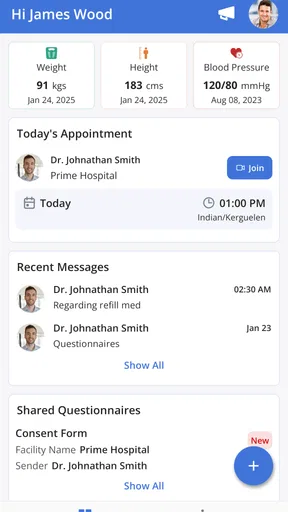
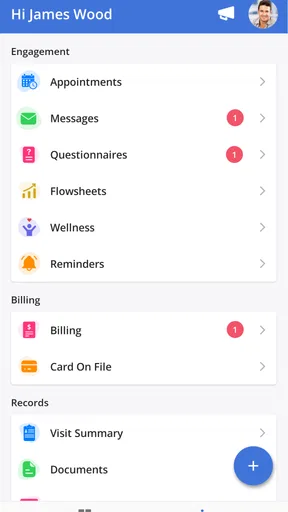
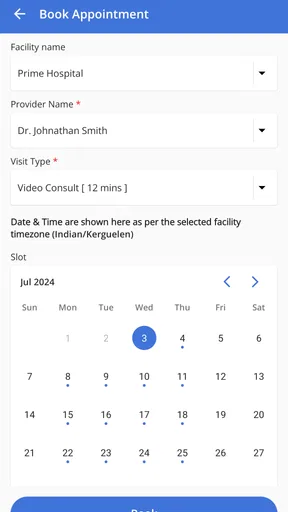
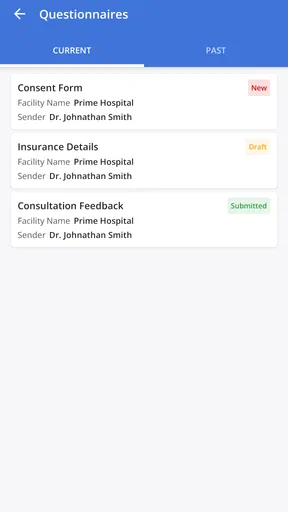
The app’s core purpose is easy to understand. I can use it to keep track of appointments, send messages to the practice, and view the health information that the practice shares with me. Those functions cover a surprisingly important part of ordinary healthcare administration. They are the tasks that often lead to missed calls, forgotten questions, or uncertainty about what was recorded after a visit.
Charm mPHR is listed as a medical app with an Everyone age rating, and it is available at no cost. The developer is Charm Health Apps / MedicalMine. Its current version is 1.6.6, and it runs on Android devices using version 6.0 or later. The app was released on June 26, 2020, and has grown to over 50 thousand installs, with a 4.3 average from 222 ratings and 52 written reviews.
Those figures suggest that it has found a real audience, but I would not interpret them as proof that it will work equally well with every clinic. The most important question is whether your healthcare practice is connected to Charm’s patient-facing system. If it is not, the app cannot become a universal record viewer or a general-purpose appointment service simply because it is installed on your phone.
Readability and navigation in a healthcare setting
For me, the strongest part of this type of app is the reduction of scattered information. Instead of searching through text messages, email threads, paper reminders, and a phone’s call history, I can look in one place for practice-related communication and appointment details. That creates a calmer starting point, particularly before a consultation when I want to review what I already know.
The shared health record is also valuable because it gives the patient a chance to read information away from the pressure of a consultation. Medical conversations move quickly, and it is easy to forget a date, instruction, or question. Being able to return to the record later supports a slower reading pace. I can check a detail when I am rested, enlarge the phone’s text if needed, or ask a trusted person to help me understand what I am seeing.
That does not mean every medical term becomes clear. A patient record is written for clinical communication as well as for the patient, so unfamiliar language can still be a barrier. I would use the record as a reference for questions, not as a substitute for asking the practice to explain something. A useful habit is to write down the exact phrase that is confusing and send a focused message rather than trying to interpret it alone.
Navigation is most effective when I approach the app with one task in mind. Checking an upcoming visit, reviewing a record entry, and composing a message are different jobs. Separating them helps avoid overlooking a small but important detail. For a person with attention difficulties, fatigue, or anxiety around medical information, this task-by-task approach is more manageable than opening the app without a clear purpose.
I also think the app is better suited to people who prefer a direct, functional interface than to users looking for extensive customization. Its value comes from access to practice information, not from turning healthcare into a highly personalized dashboard. That is a reasonable trade-off, but users who need unusually large controls, strong visual simplification, or a carefully tailored workflow should test it on their own device before relying on it.
Motor and sensory considerations
Mobile access can remove some physical barriers. I do not need to remain beside a computer or wait beside a telephone to contact the practice. Someone with limited stamina may find it easier to send a message in a short sitting, pause, and return later. Someone who finds phone conversations difficult can benefit from having a written channel for non-urgent questions, provided the practice monitors and answers it in a suitable timeframe.
The written format can also help people who process spoken information slowly, communicate more comfortably through text, or need a record of what they sent. I would still keep messages concise and organized. A short description of the issue, the relevant appointment or record context, and the question I need answered is easier for both the patient and the practice to handle than a long paragraph containing several unrelated concerns.
For users with visual differences, the phone’s own display settings may make reading more comfortable, but I would not assume that every element will respond perfectly to every system setting. Larger text can sometimes change how much information fits on screen, which may require more scrolling. That is not necessarily a problem, but it means readability should be judged in real use rather than from the app’s store description.
Sensory overload is another practical consideration. Medical information can be stressful even when the interface is quiet and straightforward. I prefer using an app like this in a calm place, with notifications and interruptions under control, rather than opening a record while commuting or during a busy family moment. The app can make information more available, but availability is not the same as emotional ease.
People with tremors, reduced dexterity, or difficulty maintaining a precise touch may find any small-screen healthcare workflow demanding. I would use the largest comfortable phone display available, keep the device stable on a surface, and avoid composing an important message while moving. Before depending on the app, it is sensible to complete a low-risk task, such as checking an appointment, and see whether the controls feel manageable.
Situational access: when the app helps most
A realistic example is a patient who remembers an important question after leaving an appointment. With a traditional phone-based routine, that person may wait until the practice is open, explain the situation to reception, and hope the question reaches the right clinician. With Charm mPHR, the patient can write the question when it comes to mind and keep a record of the communication. That does not guarantee an immediate response, but it reduces the chance that the question disappears.
Another useful situation is preparing for a follow-up visit. I can review the shared record beforehand, note anything that looks unfamiliar, and arrive with more specific questions. This is especially helpful when a patient attends appointments infrequently or has difficulty remembering the order of previous conversations. The app becomes a preparation tool, not merely a place to look after the visit.
It can also suit people who coordinate care with a trusted family member. The patient can review information privately and decide what they want to discuss or share. I would be careful with unlocked phones and shared devices, however. A medical record is sensitive, so basic device security and awareness of who can see the screen remain important even when the app itself is convenient.
For people travelling away from their normal routine, the app may provide a useful reference point for practice-related details already shared in the record. I would not treat it as a guaranteed emergency resource or assume that a message will be read immediately. If symptoms are urgent, the appropriate emergency or clinical service is still the right route. A patient portal can support continuity, but it cannot replace timely care.
The messaging function is particularly helpful for non-urgent administrative matters. I would use it to clarify a routine question, communicate information to the practice, or ask about an appointment-related issue. I would not use it to report rapidly worsening symptoms, request instant diagnosis, or wait for a response when delay could be harmful.
Where the usual alternatives may be better
The usual alternative is a phone call. Calling is often faster for an urgent administrative problem or when a receptionist needs to ask follow-up questions immediately. It may also be better for people who struggle with typing, reading, or navigating a mobile screen. On the other hand, written messaging is useful when speaking on the phone is stressful, hearing access is limited, or the patient needs time to formulate a clear explanation.
Email can be more flexible for general communication, but it may separate the conversation from the patient record and make it harder to see the relevant appointment context. Charm mPHR’s advantage is that its purpose is tied to the practice relationship. That focus is helpful, although it also means the app is not a replacement for a general email client or a broad personal health organizer.
A paper folder can still be the better choice for someone who does not use smartphones confidently, has limited digital access, or prefers a physical record during appointments. Paper also works without a battery or screen. The trade-off is that it is harder to update, search, or use for direct communication. I see Charm mPHR as an addition that can reduce paperwork, not as a reason to discard every offline backup.
Other patient portals may be preferable if a person’s healthcare is spread across several organizations and those organizations already use a different system. The most convenient portal is usually the one connected to the clinicians a patient actually sees. Installing multiple apps can create confusion, so I would first identify which practice manages the information I need most often.
Practical barriers that still matter
The main limitation is dependency on the practice. The app can display and support access to information that the practice shares, but it cannot fill gaps in clinical documentation or make an unresponsive office communicate more quickly. If appointments, messages, or records are not maintained properly by the practice, the mobile interface cannot solve that underlying problem.
There is also a learning curve for anyone who is not comfortable with patient portals. The first successful use matters more than simply having the app installed. I would begin by signing in, checking whether the expected practice connection is present, and locating the appointment and messaging areas. If a family member is helping, I would have the patient remain involved so they understand where information appears and how to ask for assistance.
Written communication can introduce its own misunderstandings. A message that feels clear to the sender may be interpreted differently by a busy practice, especially when it contains several symptoms or dates. I recommend putting the main request near the beginning, using plain language, and separating unrelated questions. Keeping a copy of important details elsewhere can also help if the conversation needs to be discussed during a later visit.
Digital access is not automatically inclusive. A person may have an older compatible device but still struggle with battery life, storage, keyboard use, or a poor data connection. Someone who shares a phone may not have a private moment to read a record. Someone with memory difficulties may need a consistent routine or a trusted support person. These are not failures of the patient; they are real conditions that affect whether a portal is practical.
I would also avoid assuming that the Everyone rating means the app is equally suitable for every child or adult situation. The rating describes general content suitability, while medical records require maturity, privacy awareness, and appropriate support. A caregiver may need to guide a younger user, and an adult who receives assistance should decide how that support is arranged.
Who should use it, and who should skip it
I would recommend Charm mPHR to patients whose practice actively uses the connected system and who want a focused way to review appointments, send non-urgent messages, and read shared health information. It is especially appealing to people who dislike repeated phone calls, need time to read, or want a written starting point before a follow-up appointment.
I would be more cautious about recommending it to someone who expects instant answers, emergency support, or a complete record from every healthcare provider they use. It is also not my first choice for a person who cannot comfortably operate a touchscreen and has no reliable support. In that case, phone, paper, or direct assistance may be more dependable.
People who manage several conditions may appreciate the central access to practice information, but they should not assume that the app alone provides a full personal medical history. I would keep a separate list of current medicines, allergies, emergency contacts, and important questions when those details are needed across different providers. A portal is strongest within its own clinical relationship.
My inclusive verdict
After looking at Charm mPHR through the lens of different abilities and everyday circumstances, I see a useful but deliberately narrow tool. Its strongest quality is focus: appointments, practice messaging, and the shared health record are brought closer to the patient without pretending to be a complete healthcare service.
The best reason to install it is to make routine communication less dependent on memory, phone calls, and paper. That benefit is meaningful for people who need extra time, prefer written communication, or want to prepare carefully for a visit. The app can also support a more independent routine when the practice keeps its information current and the patient has a secure, usable device.
Its limitations are equally important. Accessibility depends not only on the app, but on the phone, the patient’s abilities, the practice’s responsiveness, and the privacy of the situation in which it is used. I would test the basic workflow before making it the only way to reach a clinic, and I would continue using urgent-care channels when time matters.
With that realistic expectation, Charm mPHR earns my recommendation for connected patients who want a straightforward mobile link to their practice. It is free, focused, and potentially reassuring, but its real value appears when it is paired with an attentive healthcare provider and a personal backup plan for urgent or broader medical needs.
Verdict
Strengths of Charm mPHR
- Keeps personal health records organized in one accessible place.
- Can make important medical information easier to share with providers.
- Useful for tracking appointments, medications, and health history.
- May reduce reliance on scattered paper records and separate apps.
- Privacy-focused design is valuable for handling sensitive health data.
Limitations of Charm mPHR
- Requires accurate, consistent data entry to remain useful over time.
- Some features may depend on supported healthcare providers or services.
- Health information should not replace professional medical advice.
- Users may need time to learn the app’s organization and navigation.
- Losing account access could make stored records temporarily unavailable.
Similar Picks in This Category
View All
WebMD: Symptom Checker
WebMD, LLC4.1

Microphone Amplifier
DOSA Apps4.2

Anatomy Learning - 3D Anatomy
3D Medical OU4.5

Period Tracker and Calendar
SimpleInnovation4.9

GoodRx: Prescription Coupons
GoodRx4.8

CVS Health
CVS Pharmacy4.5
Frequently Asked Questions
What is Charm mPHR and what is it used for?
Charm mPHR is a personal health record application designed to help users access, organize, and manage selected medical information digitally. Depending on the healthcare provider’s setup, it may allow you to review health records, appointments, prescriptions, laboratory results, documents, and messages in one place. Its exact features can vary by organization, so access may require an account connected to a participating provider.
How do I sign in to Charm mPHR or create an account?
To use Charm mPHR, you generally need login credentials supplied by a participating clinic, hospital, or healthcare organization. Some users may receive an invitation or activation link, while others may sign in with information already registered by their provider. If you cannot access your account, have forgotten your password, or do not receive an invitation, contact the healthcare organization directly because the app may not support independent registration for every user.
What health information can I view in the app?
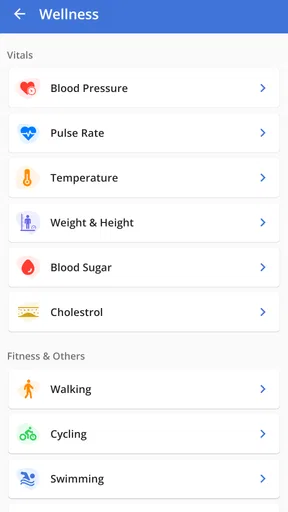
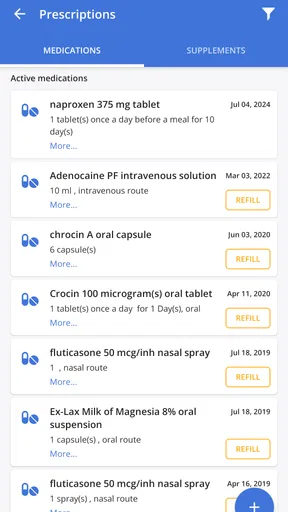
The information available in Charm mPHR depends on what your healthcare provider shares through the platform. In a typical setup, you may be able to view parts of your medical record, visit summaries, diagnoses, medications, allergies, test results, appointments, invoices, or uploaded documents. Not every record is necessarily shown immediately, and some sensitive information may require provider approval or may only be available through the organization’s web portal.
Is Charm mPHR secure and who can access my medical data?
Charm mPHR is intended for handling personal healthcare information and normally uses account authentication and protected data transmission. However, security also depends on how you protect your phone, password, email account, and verification codes. Avoid sharing login details, use a device lock, and sign out on shared devices. Before downloading, review the app’s current privacy policy and your provider’s terms to understand data handling and access permissions.
Can I use Charm mPHR without a participating healthcare provider?
Charm mPHR may have limited usefulness without an organization that supports the service. Personal health record apps often depend on a connected clinic or healthcare provider to supply records, appointments, messages, and other information. If your provider does not use the Charm system, you may be unable to activate the account or access meaningful data. Confirm compatibility with your clinic before downloading, especially if you expect full medical-record access.
